Analysis model: gpt-5.5 xhigh
Brain-State-In-A-Box by Cryptoburners - Technical Dissection
A Norwegian AGA Demo Built As An Instrument
Brain-State-In-A-Box is a full Amiga AGA demo by Cryptoburners, released
on 2 April 1994. It placed second in the Amiga demo competition at The
Gathering 1994, behind Andromeda's Sequential.
The production has only three credited authors, all individually documented in Norway:
- Heatseeker, also known as Ivar Just Olsen and Olorin: all code.
- Trixal, Jostein Dahl Gjelsvik of Bergen: title graphics.
- Vortex, also known as Blackstar and documented in Førde: music.
This is not an intro, cracktro, slideshow, musicdisk or invitation. It is an AGA full demo, but its structure is unusual. Instead of presenting a long sequence of isolated routines, it treats a voxel landscape and a rotation/feedback system as instruments. Parameters, source pictures, centres, palettes and operating modes change for more than seven minutes.
That choice split later opinion. Pouet currently records 29 positive votes, four neutral votes and six negative votes. Admirers remember the voxels, feedback and sustained atmosphere. Critics object to the harsh palettes and repetition. Both reactions describe the same deliberate construction: this is a long audiovisual state machine rather than a conventional effect reel.
Public references:
- Demozoo production, date, placing and credits: https://demozoo.org/productions/6574/
- Demozoo record for The Gathering 1994: https://demozoo.org/parties/40/
- Pouet production and later reception: https://www.pouet.net/prod.php?which=8685
- Author-supplied Aminet archive and readme: https://aminet.net/package/demo/file/BrainState
- Linked public silent-capable capture used for visual concordance: https://www.youtube.com/watch?v=sKoJBdjaEmw
The original executable, its own readme, the executable loader and a video-only copy of the linked public capture were examined separately. No music or other audio was played.
Preserved Release And Bounded Runtime Result
The Aminet LHA is 681,077 bytes and passes an archive test. It contains only the author's 4,062-byte readme and a 707,940-byte Amiga executable.
BrainState.lha
SHA-256  8d9f722f340f2bfa4e35b2251edb37e614f634ee2c3abf52174ff6e34b73345c

BrainState.exe
size     707,940 bytes
SHA-256  db9eea3826b6cbee3732299ebb1df51bcc1e1a5ec6bd0ed7805164f7e7dbcea8
The readme says that the demo requires AGA, extra memory and preferably a 25 MHz 68030 or faster. A minimal hard-disk launch was therefore tested in FS-UAE 3.2.35 as an A1200-class AGA machine with a 68030, 2 MB chip RAM and 8 MB fast RAM. Host audio used a dummy SDL driver and FS-UAE audio output was disabled.
The executable's outer loader ran, but the available AROS replacement ROM eventually halted at program counter zero before opening the authored display. The log proves that both memory regions were configured; it does not prove a successful demo run. No licensed Commodore ROM was available, so the test stops there rather than silently substituting a public video for a direct run.
For visual concordance, the production's linked public capture was downloaded as a video-only stream. It contains one H.264 video stream, no audio stream, and runs for 453.2 seconds at 600 by 480 pixels and 25 frames per second. The site publishes only the seven GIF excerpts below, never that video.
The Title Already Describes The System

Fine coloured contours move behind restrained grey lettering. The title is not simply a logo over black: it introduces the two visual ideas that govern the entire show. Lines behave like a field, while a bounded rectangle contains changing state.
The name also belongs to the Neural Network CD promoted in the release readme. Olsen explicitly calls the production a CD-release demo, and the readme dates the planned record release to 12 April. The long form and continuous parameter changes make more sense in that context than as a standard party routine checklist.
Feedback Turns One Frame Into The Next Frame's Source

The early feedback sequence repeatedly rescales and rotates the previous image before combining it with new material. A small centre becomes a tunnel; hard-edged colour islands recur at progressively different scales; recognisable source imagery is pulled into the recurrence and then loses its identity.
This is temporal recursion. The interesting object is not any one frame but the transformation from frame to frame. Small changes to angle, centre or scale compound because the output is fed back into the next input.
The author's control list supports exactly that reading. In user mode the mouse controls rotation and scaling. Holding either Amiga key moves one of two centres. Caps Lock switches smoothing, while keypad controls alter pixel disturbance, colour selection, a centre colour block and randomisation.
Those are not generic demo controls. They are the parameters visible in the animation:
rotation       changes orientation at every recurrence
scaling        decides whether the image falls inward or expands outward
two centres    produce off-axis or competing vortices
smoothing      changes the persistence from blocks to blended trails
disturbance    prevents the recurrence from settling into one stable image
The Voxel Landscape Is A Traversable Surface

The landscape is built from vertical colour columns. Nearby terrain breaks into broad steps while distant ridges compress into narrow bands. The moving horizon and occlusion between columns make the surface read as continuous terrain even though its sampling grid remains visible.
The palette is intentionally unstable. Pale mountains can sit below a pink sky, then the same geometry reappears with dark water, yellow land or a green valley. This is not evidence for several unrelated landscape renderers. The readme exposes one voxel mode with three keypad colour choices.
Its controls also explain the camera:
- forward mouse motion changes travel speed;
- sideways motion changes direction;
- Right Alt plus vertical mouse motion changes height;
- cursor keys duplicate the movement controls.
The surface therefore is not a canned bitmap scroll. It is an interactive height-field view whose path is automated for the normal show.
Recursion Can Make A Tunnel Without Tunnel Geometry

When a rectangular frame is repeatedly transformed, its older copies create nested walls. Rotation turns the nest into a twisting shaft; translation makes its vanishing point drift. The routine can therefore suggest a tunnel without storing a conventional polygonal tunnel mesh.
This phase is especially useful evidence because its geometry remains simple enough to expose the feedback process. Each coloured border is an older generation of the same source rectangle. The accumulating image is the scene.
A Corridor Emerges From Repeated Horizontal And Vertical Marks
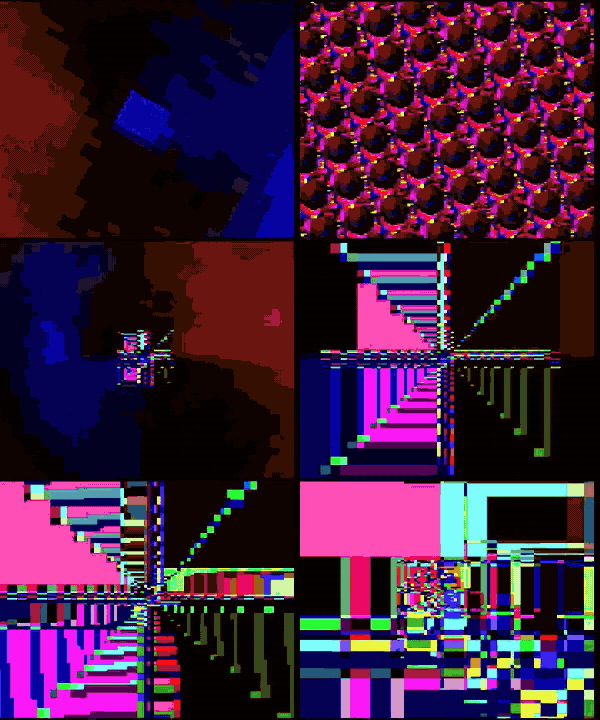
Another parameter set begins with bars arranged around a central crossing. Repeated scaling pushes older bars toward the edges while the centre keeps receiving new ones. With a small rotational offset, the construction changes from a flat cross into a corridor whose floor and ceiling appear to recede.
The strong black gaps matter. They keep individual generations legible and prevent the whole image from becoming one filled colour mass. The result is visually related to the recursive rectangle, but the different seed image changes the apparent space.
Slow Landscape Motion Is Allowed To Stay Slow
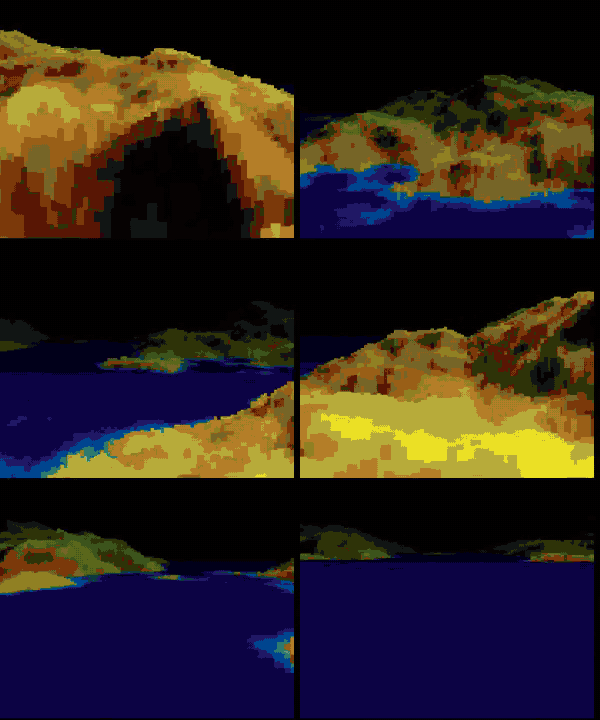
The later landscape passage is sampled here at four frames per second rather than forcing the same rate onto every excerpt. Its motion comes from steady camera travel, changing ridge overlap and gradual palette evolution. More frames would mostly repeat the same large terrain steps.
The low-resolution surface is not disguised. There is no attempt to smooth the columns into later-era texture mapping. That visible quantisation gives the routine its 1994 AGA identity and makes height, distance and colour bands easy to inspect.
Smoothing Changes Feedback From Blocks Into Light
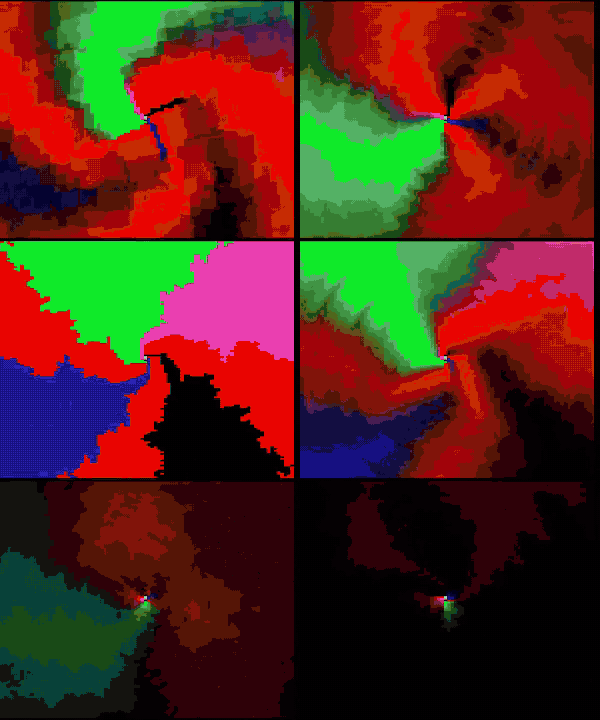
In the darker feedback phases, a compact coloured source leaves soft rotated copies around itself. The centre stays bright while older generations decay into broad trails. This is the same recurrence principle as the hard-edged opening, but smoothing and a darker source produce a very different material.
That distinction is why calling the demo "two effects" is technically true but descriptively incomplete. The code exposes a small number of rendering systems, then explores a large state space inside them.
The Executable Is A Loader Around A Packed Hunk Stream
The file begins with a valid Amiga HUNK_HEADER. Its outer table declares two
hunks:
hunk 0 allocation   0x0000009e longwords = 632 bytes
hunk 1 allocation   0x0004cb0d longwords = 1,256,500 bytes

hunk 0 stored form  HUNK_CODE, 632 bytes
hunk 1 stored form  HUNK_DATA, 707,256 bytes
The first hunk is not the demo proper. It is a compact loader and backwards depacker. The second hunk reserves about 1.20 MiB but stores only about 691 KiB. Its measured byte entropy is 7.77727 bits per byte, and readable program strings are absent. Those are mutually consistent signs of compressed payload data, not proof of a particular named packer.
The 632-byte loader does more than expand bytes. Its disassembly shows that
it reconstructs another Amiga hunk stream and performs a private LoadSeg
operation:
- it recognises
HUNK_CODE/HUNK_DATA-class records; - it allocates each recovered hunk through the Exec library;
- it links the resulting BCPL segment list;
- it recognises
HUNK_RELOC32; - it adds target segment bases at relocation offsets;
- it frees temporary source storage;
- it flushes caches on sufficiently new Exec versions.
This explains both the large second-hunk allocation and the lack of useful plain strings in the disk file. The outer executable is a transport envelope for a complete inner executable, not merely one compressed picture or module.
The Backwards Depacker Is Small But Specific
The decompression core occupies the latter part of the 632-byte loader. It starts at the end of the packed buffer and writes toward lower addresses. Bits are consumed from a 32-bit shift register; when it empties, another longword is fetched backwards.
Two broad command families are visible:
- literal runs read bytes from the packed source and write them backwards;
- match runs recover a distance and length, then copy already expanded bytes.
A small table immediately after the code supplies match-length parameters.
The routine also writes the current destination address to custom register
$dff1a2. That write is observable in the loader, but its purpose is not
identified here; assigning it a timing or visual role would go beyond the
evidence.
The important architectural point is firmer: decompression happens before the inner hunk loader allocates and relocates the final segments. Packing and Amiga executable loading are deliberately fused into one startup stub.
The Readme Describes A Hidden Live Mode
The normal production is automated, but the release includes a substantial user mode. Both Shift, Alt and Amiga key combinations enter it. Function keys select or initialise source pictures, clear the screen and reset feedback. Number keys choose voxel, feedback, rotation and fade modes.
That interface changes the interpretation of the demo. The party sequence is one authored performance of a reusable visual instrument. Its long holds are not only padding between calculations: they expose parameter ranges that a viewer could later explore manually.
This also provides unusually strong runtime documentation. The public capture shows the modes and parameter changes; the contemporary readme independently names the same modes and their controls.
What Can And Cannot Be Claimed
The evidence supports these conclusions:
- this is the Norwegian Cryptoburners AGA demo placed second at The Gathering 1994;
- all three credited authors are individually documented in Norway;
- the release archive is intact and contains the author's own requirements and interactive control map;
- the show is organised around voxel, feedback, rotation and fade modes;
- the outer executable contains a 632-byte backwards depacker and private hunk loader around a 707,256-byte packed payload;
- the linked public video agrees with the modes described by the readme.
The evidence does not support claiming a successful replacement-ROM run, a specific named compression product, or a complete disassembly of the packed inner renderer. It also does not justify calling every visible scene a separate effect.
Brain-State-In-A-Box is best understood as an early AGA visual synthesiser
presented as a demo. Its narrow set of systems is a strength and a liability:
feedback makes simple seeds generate surprising spaces, while seven minutes
of the same recurrence makes every palette decision impossible to hide.
That tension is exactly why the production remains memorable enough to argue
about.