Analysis model: gpt-5.5 xhigh
Lifeforms by Halcyon - Technical Dissection
Scope
Lifeforms is a Finnish MS-DOS demo by Halcyon, released on 1 July 1995 and
ranked third in the Juhla 1995 2.5 PC demo competition. Demozoo credits Blitz
with code and Croaker with music; both profiles explicitly place them in
Finland. The focus here is the complete original runtime and the working code
in the unpacked DOS executable: the W. Collis wrapper, nine RIX pages in
KUVA.DAT, XMS page staging, palette handling, transparent page overlays,
filled-shape helpers, and the fixed-point texture triangle mapper.
Sources:
- Scene.org party archive: https://files.scene.org/view/parties/1995/juhla95-2/demo/lifeform.zip
- Scene.org duplicate archive: https://files.scene.org/view/parties/1995/juhla95-2/demo/h_life.zip
- Scene.org party results: https://files.scene.org/view/parties/1995/juhla95-2/results.txt
- Scene.org party demo directory: https://files.scene.org/browse/parties/1995/juhla95-2/demo/
- Demozoo production: https://demozoo.org/productions/28270/
- Blitz profile: https://demozoo.org/sceners/571/
- Croaker profile: https://demozoo.org/sceners/124/
- Pouet production: https://www.pouet.net/prod.php?which=1271
The results file lists the PC demo top three as X14 by Orange, Cyboman 3
by Plant, and Lifeforms by Halcyon.
Archive Contents
The examined archive is the public Scene.org lifeform.zip:
1b04cfaa7e5bd230d95946b06493b036b8b0be49d40ff8e7d0b6cbd7aa42c00c lifeform.zip
The duplicate h_life.zip has a different zip container but extracts to the
same files:
779f292e081d62e3586843db3383f15c4fdb70b70b2291a869927abf7f5021bb h_life.zip
The archive contains:
KUVA.DAT      583002 bytes
HERMO.S3M     182166 bytes
LIFEFORM.EXE   85308 bytes
FILE_ID.DIZ      252 bytes
INFO             963 bytes
Extracted file hashes:
d21d6e0cc48e7d3b9305f010c9928942d30c7cd9506ef659c6d4dda383a0586a  FILE_ID.DIZ
849290be93a60a33afa27ffabe97c0ab2d0a9ee7c02d30f7c9a4134b5cb1ded6  HERMO.S3M
369568f0f7c95b2b1ef6e78fe555d8211b6d54838253034c3c851c6878e4e43b  INFO
8bace7d46be1f4ab574f46b8938fab1142d755f74ab1db6e3084cb8d60471133  KUVA.DAT
68177a7d340c03788c4b95901c1bdc93cf7e150d2a6d0851f07f6f54dabe5738  LIFEFORM.EXE
INFO says the demo was made in four days and finished only a few minutes
before the Juhla 2.5 demo competition deadline. It also frames the theme around
animals and lifeforms. Old private contact listings are not reproduced here.
Complete Direct Silent Run
The preserved h_life.zip archive was run directly in DOSBox-X 2026.01.02.
The emulated Gravis Ultrasound and MIDAS player remained active so the demo
could use its normal music-position timing, while SDL used a dummy host audio
driver. No sound was played or recorded.
Machine:        svga_s3
Memory:         16 MB
CPU:            normal core, fixed 20000 cycles
DOS memory:     XMS and EMS on
Audio path:     GUS enabled, SDL dummy host audio
Capture:        lossless FFV1 from a private 1024x768 X display
Observed run:   170 seconds, including the stable end tableau
The observed show begins with a face emerging through a blue field, then runs
through all the photographic pages, words, filled objects, wire and textured
geometry, and the final LIFE IS SHORT card. It reaches a rotating gold form
labelled LIFEFORMS / HALCYON 1995 and remains there. That is the intentional
end tableau, not an emulator freeze.
The five GIFs below are continuous six-second excerpts from that complete direct run. They are cropped to the 320x200 DOS display, scaled uniformly to 400x250, and encoded at 8 fps. They contain no audio, H.264 video, contact sheet, or third-party footage.
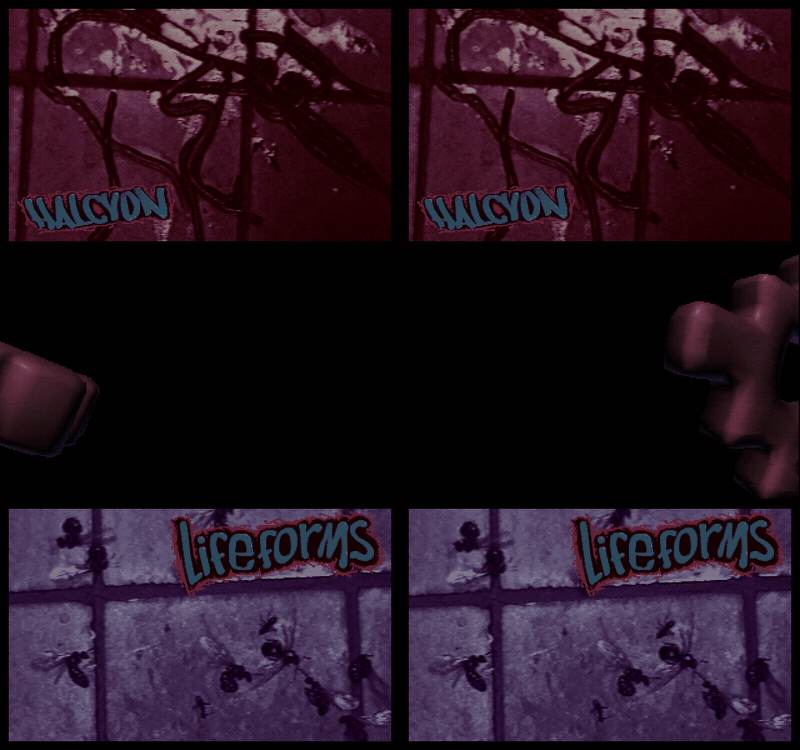
The animal photographs are not passive title cards. Halcyon's logo, stark colour changes and new page material enter over them in quick succession. The result is closer to a cut-up graphic sequence than a slideshow.

The egg scene places a smoothly shaded body against a dense purple line field. A separate red patch and small solid move around it, making the object read as assembled layers rather than one flat pre-rendered picture.

The dot field resolves into a cube, rotates and changes scale while the background page stays fixed. This is one of the clearest points where simple generated geometry is made part of the page design rather than presented as an isolated benchmark effect.
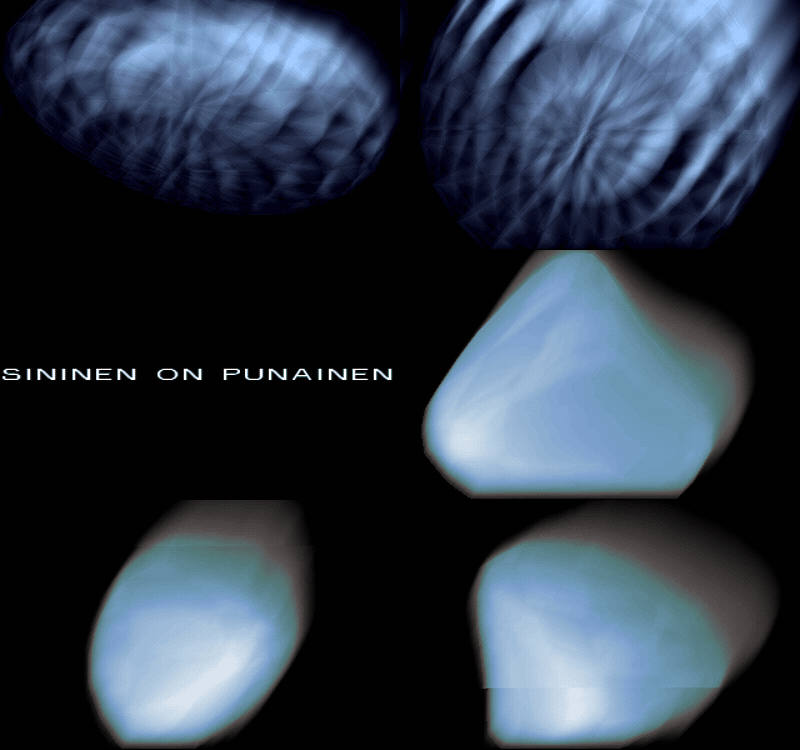
Late in the show, a soft blue form deforms and turns with broad interpolated shading. Its deliberately indistinct surface contrasts with the earlier hard wireframe and spike structures.

The end is restrained: a gold object continues rotating behind fixed white lettering. The persistent motion makes the tableau visibly alive while also giving the run an unambiguous stopping point.
Runtime-To-Code Concordance
The direct runtime is most useful when read against the helper map below. The demo is not a large general-purpose engine; it is a short script that switches between full RIX pages, transparent overlays, palette transitions, span-filled shapes, and one late textured-object renderer.
visible runtime family              recovered mechanism
----------------------------------  ------------------------------------------
face/page stills                    XMS-staged 320x200 RIX page copies
logo/page overlay                   reverse nonzero full-page copier at 0x3c0f
white flashes and fades             full DAC writes and 0x25872 palette nudger
filled/spike shape clip             horizontal span helpers and disk routine
sphere/texture clip                 fixed-point triangle span mapper
wire/object clip                    mesh transform/projection feeding triangles
scene cuts                          S3M player/order gates in the main script
That model explains the rhythm of the excerpts. The early screens behave like
designed pages because they are exactly that: KUVA.DAT provides nine complete
RIX pages, and XMS moves them into low-memory work or visible pages at music
positions. Their overlays are not a separate sprite engine; they are full-page
nonzero compositing passes where color zero remains transparent.
The dot cube exposes generated geometry rather than only the image loader. The disk routine elsewhere draws horizontal spans, and mirrored span placement is enough to produce expanding filled shapes and the spiky transitions seen in the full run. Hard white flashes and smoother fades are palette operations around those page or shape changes.
The egg, wire, soft-organic and gold-title objects are the computational peak.
Those parts use the mesh/face pipeline and fixed-point triangle mapper instead
of only copying RIX pages. Vertices are transformed, face orientation is
tested, and the mapper fills scanline spans with texture coordinates advanced
through carry-aware integer/fraction steps. This is where Lifeforms stops
being page staging and becomes a small custom 3D/textured object renderer.
Audio And Image Data
HERMO.S3M is a Scream Tracker 3 module. Its title is hermohairio in a
plain ASCII transliteration:
orders:      32
instruments: 24
patterns:    18
global vol:  64
speed:        6
tempo:      160
master vol: 176
active channels: 6
KUVA.DAT is much simpler than its size first suggests. It is nine consecutive
ColoRIX-style 320x200x256 images. RIX3 markers occur at these offsets:
0
64778
129556
194334
259112
323890
388668
453446
518224
Each record is exactly:
10-byte RIX header
768-byte VGA palette
64000-byte chunky pixel page
That means one record is 10 + 768 + 64000 = 64778 bytes. The loader's magic
constants match this exactly:
0x030a = 10 + 768
0xfa00 = 64000
The image file is therefore a stack of full-screen pages rather than a custom packed scene format. The code gets its variety by copying, overlaying, fading, and warping these pages.
Executable Unpacking
The original LIFEFORM.EXE is an MZ executable:
declared size:       85308 bytes
actual size:         85308 bytes
header paragraphs:      2
relocations:             0
CS:IP:             0000:0000
SS:SP:             293d:0800
entry file offset:  0x20
The packed body contains a W. Collis decompressor signature:
Copyright (c) 1991 W Collis
UNP expands the executable under DOSBox-X to 173056 bytes:
e84cd7f843688993df7fb03d40ba9e4043314d2ef25bf84e6b83b3cb0b4c89aa unpacked LIFEFORM.EXE
The unpacked MZ has a much larger relocation table:
declared size:       173056 bytes
actual size:         173056 bytes
header paragraphs:    366
relocations:          1455
CS:IP:             0000:3cca
SS:SP:             3760:4000
entry file offset:  0x53aa
load image size:   167200 bytes
Offsets below are offsets in the unpacked load image. Far pointers are resolved
as segment * 16 + offset inside that image. For example:
261d:0000 -> 0x261d0
2568:05a4 -> 0x25c24
0d19:021e -> 0x0d3ae
Top-Level Startup
The entry at 0x3cca is a C/Turbo Pascal-style real-mode program. It first
calls runtime setup, video/helper setup, and module/setup helpers:
3cca: lcall 261d:0000
3ccf: lcall 2568:0a76
3cd4: lcall 2502:000d
3cd9: lcall 24fe:0031
3cde: lcall 24fb:0000
3ce3: lcall 1e7a:0000
Then it checks XMS:
0d19:01af  XMS presence check
0d19:01ce  free-XMS query
0d19:01e2  allocate XMS blocks
0d19:021e  XMS move wrapper
The program wants XMS because it treats the RIX pages as 64K-ish full-screen images. The low DOS memory page is only the staging buffer; XMS stores several full images for later copies.
After XMS setup, the entry code allocates multiple 64K blocks and records the
handles near 0x34d6..0x3503. It also obtains a low-memory 64K work segment
and stores it at:
0x3528/0x352a  far pointer to the low-memory buffer
0x352c         low-memory segment word
The KUVA.DAT loader builds an XMS move descriptor at 0x34aa:
0x34aa  byte count low word, usually 0xfa00
0x34ac  byte count high word
0x34ae  input handle or segment
0x34b0  input offset low word
0x34b2  input offset high word
0x34b4  output handle or segment
0x34b6  output offset low word
0x34b8  output offset high word
The first palette is read to 0x382e as 0x300 bytes. Pixel pages are read to
the low buffer, then moved into XMS blocks. Between image pages the file offset
is advanced by 0x30a + 0xfa00, exactly matching the RIX header, palette, and
pixel payload.
Runtime And XMS Helpers
The segment at 0x261d0 is mostly compiler/runtime machinery. It checks CPU
class, saves interrupt vectors through INT 21h AH=35h, installs its own runtime
vectors through AH=25h, and restores them on exit. This is not the visual core.
The XMS helpers in segment 0x0d19 are much more relevant:
0d33f: mov ax,4300h
       int 2fh              ; XMS present?
       ...
       mov ax,4310h
       int 2fh              ; fetch XMS entry pointer
       store pointer at 34d2/34d4
The move helper at 0x0d3ae calls the XMS function pointer with function
0x0b and the move descriptor supplied by the caller. This is the same helper
used both during image loading and later during scene changes.
VGA Page Helpers
The helper segment at 0x2568 contains the useful screen primitives.
Mode Set
0x3c08 is the tiny visible-mode switch:
mov ax,0013h
int 10h
ret
The rest of the code assumes Mode 13h: one chunky byte per pixel at 320x200.
Palette Upload: 0x25c24
The palette uploader receives a far pointer to 768 bytes:
push bp
mov  bp,sp
push ds
lds  si,[bp+06]
mov  dx,03c8h
xor  al,al
out  dx,al
inc  dx
mov  cx,0300h
rep  outsb
pop  ds
retf 4
It always starts at DAC index zero and writes the whole palette in one linear
stream to port 03c9h.
Clear Page: 0x25c3c
The page clear uses 386 dword stores:
es = destination segment
di = 0
cx = 0x3e80          ; 16000 dwords = 64000 bytes
eax = 0
rep stosd
Full Page Copy: 0x25c51
The page copy is the same size, but with rep movsd:
ds:si = input segment:0
es:di = output segment:0
cx    = 0x3e80
rep movsd
This is the plain 64K page path used when an image already exists in low memory.
Rectangular Copy: 0x25c6a
The rectangle copy computes a Mode 13h offset with a classic cheap multiply:
bh = y
bl = 0
bx >>= 2
bh += y
bx += x
That is (y << 8) + (y << 6) + x, or y * 320 + x, without an imul.
Then it copies rows:
width_dwords = (x2 - x1) >> 2
row_skip     = 320 - (x2 - x1)

for each row:
    rep movsd
    si += row_skip
    di += row_skip
It is tuned for dword-aligned blocks; odd-width cleanup is not the point of this routine.
Reverse Nonzero Overlay Copier: 0x3c0f
This small helper is one of the most direct "design" routines in the demo. It draws a full-screen page over another page, but treats color zero as transparent:
push bp
mov  bp,sp
push ds

es = [bp+06]          ; output segment
di = 0xfa00
si = [bp+04] + 0xfa00
ds = [bp+08]          ; input segment
xor ch,ch

loop:
    cl = [si]
    if cx != 0:
        es:[di] = cl
    dec si
    dec di
    jne loop

pop ds
retf 6
The scan is backward. Because DI starts at 0xfa00 and the loop stops when
DI becomes zero, it writes offsets 0xfa00 down to 1 and skips offset zero.
For a full-screen page this off-by-one is visually irrelevant, but it confirms
the routine was written as a compact page overlay rather than a general sprite
blitter.
The effect is:
for p from 64000 down to 1:
    c = input[p]
    if c != 0:
        output[p] = c
That lets pre-rendered animal/text silhouettes be composited over another page without building a separate mask.
The animal-page excerpt above shows this routine's purpose: pre-rendered page material enters over a darker background while zero-valued pixels remain transparent. The result reads as a designed overlay even though the code is just a compact full-page nonzero copier.
Horizontal Fill And Disk Helpers
The clipped horizontal fill at 0x256a0 is the primitive underneath the
software disks and filled shapes. It checks bounds stored around
0xf5b6..0xf5bc, computes y * 320 + x, then writes repeated color words:
offset = (y << 8) + (y << 6) + x
es     = [0xf5c0]
di     = offset
ax     = color | (color << 8)
cx     = width >> 1
rep stosw
if width is odd:
    stosb
0x2576a is the same span idea with less clipping. The disk routine at
0x25791 uses these line helpers four times per loop step. It computes
radius * radius, walks one axis, derives the paired extent, and draws mirrored
horizontal spans:
draw span at cy + y from cx - x to cx + x
draw span at cy - y from cx - x to cx + x
draw span at cy + x from cx - y to cx + y
draw span at cy - x from cx - y to cx + y
This makes filled circles with only horizontal writes in the hot path. The
visible sequence around 0x1d34 uses it for expanding and contracting disks:
for r = 100 down to 64:
    disk(160, 100, r, r + 100)

for r = 63 down to 4:
    disk(160, 100, r, 64 - r)

disk(160, 100, 4, 64)
The unusual final argument is color or shade data passed to the helper family, not a floating-point radius.
The dot-field excerpt makes the generated-shape side of the show visible. The
motion is not a bitmap movie stored in KUVA.DAT; the code draws simple filled
geometry over page material using clipped horizontal writes.
Palette Fades
There are two palette systems.
The simple white-out loop appears several times in the main script:
wait for vertical retrace
out 03c8h, 0
repeat 0x300 times:
    out 03c9h, 0x3f
wait four retrace edges
restore/copy page
This hard-sets all 768 DAC channels to maximum intensity, waits a few frames, then swaps or restores the image. It is a cheap flash transition.
The more general fade routine at 0x25872 reads the current DAC into a
768-byte table at 0xf2b5, then nudges every channel toward a target:
read DAC[0..255] into temp palette

repeat:
    wait retrace high
    wait retrace low
    for entry 0..255:
        for channel r,g,b:
            if current > target: current -= step, clamp at target
            if current < target: current += step, clamp at target
        write entry with 0x25857
until every channel equals the target
The single-entry writer at 0x25857 is direct port code:
dx = 03c8h
out dx, palette_index
dx = 03c9h
out dx, r
out dx, g
out dx, b
There is also an interpolation routine at 0x0d65b. It copies two 768-byte
palettes onto the stack and writes a fractional blend:
out = old + (((new - old) << 2) * step >> 8)
The shift by two matches VGA's six-bit channel range. It gives a quick
step/64 style blend without floating point.
256-Wide Buffer Blend
The routine starting around 0x1d34 also builds a 256-wide temporary image.
After drawing disks into two pages, it adds the corresponding bytes from two
320-wide pages and writes the result into a 256-wide buffer:
for y in 0..199:
    for x in 0..255:
        a = page_a[y * 320 + x]
        b = page_b[y * 320 + x]
        temp[y * 256 + x] = (a + b) & 255
A related crop path elsewhere reads page[y * 320 + x + 32] and writes
temp[y * 256 + x]. That centers a 256-pixel-wide working image inside the
320-pixel screen, leaving 32 pixels of side margin.
Textured Triangle Core
The most sophisticated visual code is the triangle mapper. There are two close variants:
0x642e  near-wrapper triangle mapper
0xd3d2  far-call triangle mapper
Both have the same structure:
- Find the triangle's minimum and maximum Y.
- Reject triangles wholly above, below, or with no height.
- Clamp Y to
0..199. - Clear a per-scanline edge table with sentinel
0x80008000. - Call the edge builder three times, once per triangle edge.
- Walk scanlines and draw spans between left and right edge values.
The edge table starts at 0xd076. Each scanline gets two 16-bit X entries:
edge[y].left_x
edge[y].right_x
The sentinel clear is:
di = d076h + min_y * 4
cx = max_y - min_y + 1
eax = 80008000h
rep stosd
0x8000 means "not filled yet". The first edge touching a scanline writes the
left slot; the second writes the right slot.
Edge Builder: 0xd8ad
The edge builder takes two endpoints and two texture-coordinate pairs. It sorts the endpoints by Y, computes a 16.16 X step, and records both screen X and the interpolated texture endpoints for that scanline.
The key slope setup:
dy = y2 - y1
dx = x2 - x1
eax = dx << 16
edx:eax = eax / dy
x_step_int  = ax
x_step_frac = dx
It then builds texture-step words from endpoint differences. The code uses a
small reciprocal/multiply lookup table in the segment stored at 0x352c. The
lookup index combines a signed channel delta and the current span length:
lookup_index = ((delta + 128) << 8) + (length * 2)
step_word    = table[lookup_index]
The scanline loop has two paths:
if edge[y].left_x == 0x8000:
    store x and first texture pair
else:
    store x and second texture pair

x       += x_step
tex_a   += tex_a_step
tex_b   += tex_b_step
y       += 1
The edge table therefore holds:
left_x/right_x
left texture pair
right texture pair
These side tables live at offsets relative to the edge-table pointer:
+0x000  left/right X
+0x644  first texture component for side A/B
+0x966  second texture component for side A/B
The values are byte-sized texture coordinates packed around the X endpoints.
Span Inner Loop: 0xd3d2
After all three edges are installed, the triangle mapper loops over scanlines. For each row:
left_x  = edge[y].left_x
right_x = edge[y].right_x
if either is sentinel, treat it as clipped to zero
clamp each X to 0..319
if left_x > right_x, swap endpoints and swap texture endpoints
span_len = right_x - left_x
Then it computes two per-pixel texture steps using the reciprocal table:
du_step = recip_table[((u_right - u_left + 128) << 8) + span_len * 2]
dv_step = recip_table[((v_right - v_left + 128) << 8) + span_len * 2]
The destination pointer is the current line:
dest = screen_segment + y * 320 + left_x
The input texture segment comes from [0xf5ca]; the output page comes from
[0xf5c0].
The inner mapper is carefully arranged to emit one odd pixel first, then pairs:
if span_len is odd:
    advance u/v once
    al = texture[v:u]
    output[di] = al
    di++

pair_count = span_len >> 1
while pair_count != 0:
    advance u/v
    al = texture[v:u]
    advance u/v
    ah = texture[v:u]
    stosw
The 32-bit registers hold the fractional accumulators:
ECX  fractional part for one texture axis
EBX  integer/segment-combined texture pointer
EDX  packed step for one axis
ESI  packed step/carry for the other axis
The code uses adc after adding the fractional step, so carries from the low
fraction advance the high texture byte:
add ecx, step_low
adc ebx, step_high
adc bh, carried_texture_byte
mov al, [bx]
This is the classic real-mode trick: keep texture coordinates in split integer
and fraction pieces, let the CPU carry flag update the next byte, and sample
with a plain mov from the texture segment.
The egg and soft-organic excerpts show why the triangle mapper deserves attention despite the demo's page-heavy structure. The late sequence combines a generated or staged background page with moving filled/textured geometry, so the fixed-point mapper is the part of the code that turns the static RIX assets into a live object scene.
Face And Vertex Pipeline
The scene around 0x693f..0x75d9 prepares the data that feeds the triangle
mapper.
First it clears a 64K work page:
es = [0xf5c4]
di = 0
cx = 0x4000
eax = 0
rep stosd
Then it clears three coordinate banks for every vertex:
0x8620..  bank 0
0x904c..  bank 1
0x9a78..  bank 2
Each vertex bank stores three 16-bit components. The face index table starts at
0x5d82; every face stores three vertex indexes:
face[i].v0 at 0x5d82 + i * 6
face[i].v1 at 0x5d84 + i * 6
face[i].v2 at 0x5d86 + i * 6
The base vertex table starts at 0x4930, with three words per vertex:
vertex[n].x at 0x4930 + n * 6
vertex[n].y at 0x4932 + n * 6
vertex[n].z at 0x4934 + n * 6
For each face, the code gathers its three vertices into temporaries
0xc676..0xc686, divides each component by three, and computes cross-product
terms. The repeated pattern is:
nx = (z2 - z1) * (y3 - y1) - (z3 - z1) * (y2 - y1)
ny = (z2 - z1) * (x3 - x1) - (z3 - z1) * (x2 - x1)
nz = (y2 - y1) * (x3 - x1) - (y3 - y1) * (x2 - x1)
The code calls runtime 32-bit arithmetic helpers to normalize or scale these products, then stores transformed values back into the three vertex banks. It also computes a fallback vector constant:
0xe273:0x1758:0x51b7
That value is used when a runtime comparison says the computed vector is zero or unusable.
The projection path later reads sin/cos-like values from a 0x0a00-entry table
at 0xb22c. Angles advance each frame:
0xc62e += 0x08
0xc630 += 0x08
0xc632 += 0x10
all masked with 0x07ff
The transform loops use signed 16-bit multiplies and keep the high word after doubling the product:
imul coefficient
add ax,ax
adc dx,dx
use dx as the scaled result
Projection then divides by depth plus a bias:
screen_x = center_x + ((x << 8) / z)
screen_y = center_y + ((y << 8) / z)
The screen center starts at approximately (0x80, 0x4d), then the face pass
adds object offsets for some vertices.
Before drawing a face, the code performs an orientation test through
0x0d19:05bf. If the test passes and a parity flag permits the face, it calls
the triangle mapper:
push v0.x
push v0.y
push v1.x
push v1.y
push v2.x
push v2.y
call 0x642e
The parity flag flips after face index 0x018f, so the object uses two
alternating face groups or texture sides:
if face_index is odd: draw group A
if face_index > 0x018f: invert that choice
This is not a general 3D library. It is a tight object renderer for the demo's specific mesh and texture data.
Main Script Around 0x4a00
The main visual script is a sequence of page, palette, music-timing, and XMS operations. A representative block:
select text/image pointer at 0x412e
upload palette with 2568:05a4
set XMS descriptor for 64000 bytes
wait one retrace edge
move XMS page to visible/work page through 0d19:021e
poll the music/player state through a callback at [351c]
repeat until the song position/order reaches a threshold
The repeated hard-white flash looks like:
wait retrace high
out 03c8h,0
for i = 0..767:
    out 03c9h,3fh
wait four full retrace edges
copy/restore page
Several blocks set 0x34aa to 0xfa00, set 0x34ae to an XMS image handle,
set the destination segment from 0xf5c2 or 0xf5c6, and call
0d19:021e. Those are full 320x200 image swaps. Calls to the page-copy helper
at 2568:05bc move low-memory pages between the internal buffers.
The player/timing callback stores status at 0x3520. The script tests fields
such as:
[status+08] >= 4
[status+0c] >= 0x28
[status+08] >= 0x0b
[status+08] >= 0x1b
These are module-position gates. The demo waits for the music state to reach a specific order/row before switching scenes.
What Each Part Does
The demo is built from a few simple but well-chosen systems:
- The W. Collis stub compresses a larger real-mode program into the party EXE.
KUVA.DATstores nine full RIX pages used as backgrounds, overlays, and texture or work-page material.- XMS gives the real-mode code enough room to keep several 64K pages alive.
- The Mode 13h helpers clear, copy, crop, and upload whole pages without a heavy graphics framework.
- The reverse nonzero copier overlays pre-rendered silhouettes and text using color zero as transparency.
- The disk and span helpers draw filled circles and transitions with only horizontal writes.
- The palette routines supply both smooth fades and hard white flash cuts.
- The triangle mapper is the fancy part: it clears edge tables, builds three textured edges, clamps scanlines, computes texture steps, and writes mapped spans two pixels at a time.
- The mesh path transforms and projects vertices with fixed-point multiply and divide, tests face orientation, and feeds visible triangles to that mapper.
- The main script is gated by the S3M player state, so page swaps, flashes, overlays, and 3D parts hit the intended musical positions.
The code is compact because most visual state is either a full-screen RIX page or a fixed table in the executable. The computationally expensive part is not the loader. It is the software triangle mapper and its edge/texture stepping loops.